
Or, to be more precise: ‘What is photo metadata?’
While looking through some drone photos recently, I noticed just how much information the drone records about each image. There’s lots (and I mean lots) of it, some of it useful and some of it obscure.

This is one of the photos I was looking at, taken with the Mavic 3 Pro drone near the Queensferry Crossing at sunset.
As well as bog standard pieces of info like the date and time the image was created, the drone also records the GPS coordinates (x,y position on the earth’s surface), and its height above the ground (both relative to take off point and to sea level!).
Additional information includes which way the drone was facing, how far the camera was angled up or down, the shutter speed, aperture, ISO settings…
I’ll stop there, but you get the picture (and please forgive the pun). All this information about the photograph is given a name:
metadata
“meta” comes from the ancient Greeks and one of its modern meanings is “about the thing itself”. Metadata is therefore data about data. It is data whose purpose is to define and describe the object it is linked to, in our case a photo.
When you press the shutter on your camera, this information is written into the image file. You can’t see it when you open and view the image, you need software to view it – more on this later. The screenshot below from my Lightroom software illustrates some of the metadata that I’ve opted to save along with the photo shown above.
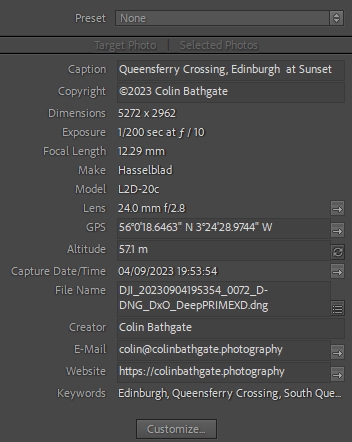
“So what?” I hear you ask. Well, there are several reasons you should care about metadata in your images.
Advantages of Metadata
Metadata provides valuable information about when the image was taken, when it was updated, the camera settings, and more. This is useful not just for photographers, but anyone interested in the context of the image.
The metadata can also include copyright information and the creator’s details, which are crucial for protecting your intellectual property or respecting the rights of others.
Metadata also helps you organize and search for images more effectively. You can use keywords, tags, and descriptions to quickly locate specific images in your collection.
The screenshot below is a very basic example of filtering by metadata, where I’ve used the Lightroom application to filter photos by year , camera, and lens. All the data is contained in the images themselves, and Lightroom is making use of this to allow me to organise and search more effectively.
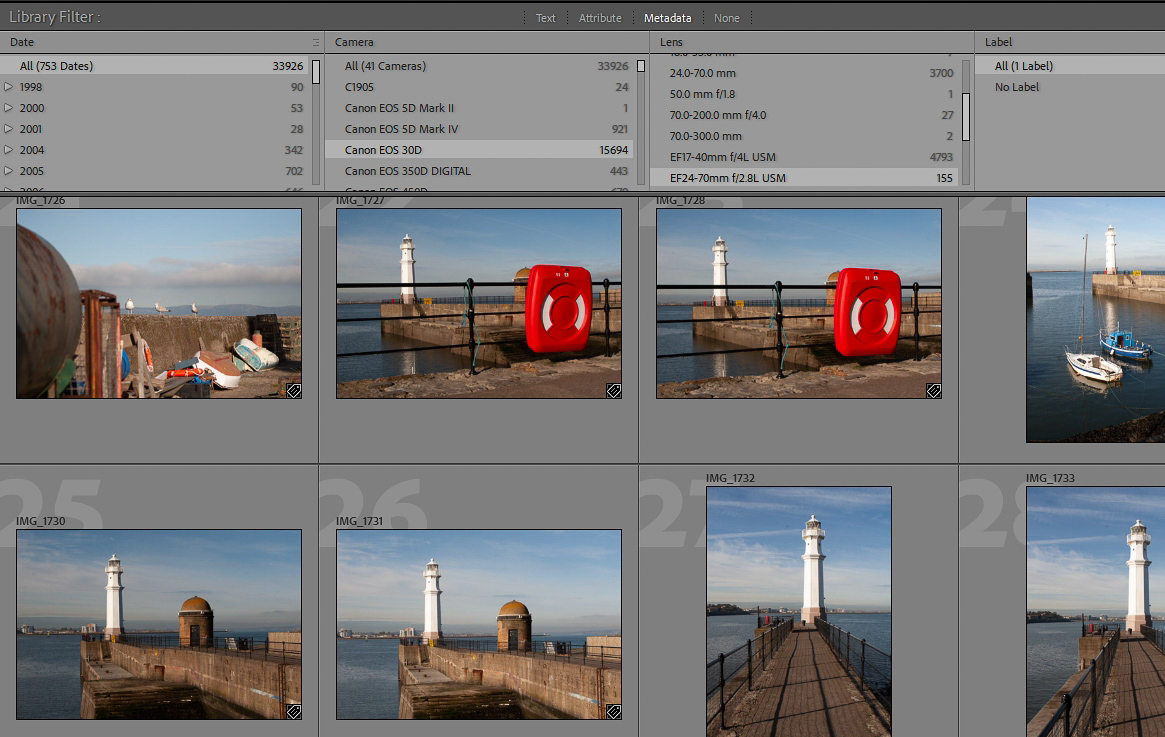
I could also search by keywords that I’ve added to the photo, so in a matter of seconds I can find every photograph containing the keyword ‘Queensferry’ or ‘Drone’, or any combination of keywords.
What types of Photo Metadata are there?
There are two main types of photographic metadata: EXIF and IPTC (sorry about introducing acronyms – the descriptions below are brief and non technical!).
- EXIF stands for Exchangeable Image File Format. This data is like a ‘photographer’s notebook’. It includes technical details about the image, such as the camera used, exposure settings, and date taken. The camera automatically generates this data, and is more focused on the image’s creation. Many people use the term ‘EXIF data’ to mean all metadata contained in an image.
- IPTC stands for International Press Telecommunications Council. This data is like a ‘caption and filing system.’ It contains information like captions, keywords, and copyright details, added by the photographer or editor. It’s more about describing and organizing the image for use in media and publishing.
In simple terms, EXIF is about how the image was made, while IPTC is about what the image is and how it’s used.
There is a third type of metadata. You may have heard of XMP (Extensible Metadata Platform). Adobe helped to create this new standard, and it’s often used in conjunction with their software e.g. Photoshop and Lightroom.
Should I be concerned about Privacy?
Whether you should worry about image metadata depends on your specific needs and concerns. There are individuals and organisations who may want to make use of metadata in your photos for all sorts of reasons. As a high profile example, Facebook claim to remove EXIF information from photos their users upload, but there is evidence that they store the information after removing it from uploaded images for reasons they like to keep to themselves.
You should be mindful of the personal information contained in metadata when you’re sharing images, particularly location data. There’s an interesting story about John McAfee (founder of the well known anti virus package) who was on the run from police, but his location was given away by a careless journalist’s photo. So if you’re planning to go on the run make sure you don’t send images to anyone without first removing your location information!
In most cases, you don’t need to ‘worry’ about metadata, but being aware of its presence and its potential implications can help you make informed decisions about how you share your photos. If privacy or copyright concerns you, you can take steps to modify or even remove metadata from your photos.
How can I Edit Metadata?
There are several ways to edit or remove metadata from images singly or in bulk, depending on your preferences and needs.
There are various websites that offer simple online tools. A quick online search will bring up lots of them, but I’m not going to recommend any specific site because I don’t think it’s the best way to remove information from your photos. There are too many dodgy sites out there crammed with adverts and malware.
Image editing software like Adobe Photoshop, or Lightroom, Affinity Photo, or Gimp (which is free) allow you to add or remove an image’s metadata, or export the image without any metadata. This method gives you better control, but requires software installation and there’s a learning curve. If you’re using Windows, Microsoft offer a free and very basic tool called Easy EXIF Delete that does what it says on the tin.
There are also many dedicated mobile apps you can freely download, like Photo EXIF Editor, or the imaginatively named Photo Data Remover for Android. For iOS there’s an app called EXIF Metadata. These are designed specifically for either modifying or removing metadata from photos on mobile devices. Remember that when removing metadata, it’s a good idea to keep a copy of the original image with metadata intact if you ever need it for reference. Another alternative is simply to create a screenshot of the photo you wish to send if it’s a one-off and where the quality doesn’t matter too much. You could also change your phone’s settings so it doesn’t record location information if you won’t ever have a use for this.
In conclusion…
Knowing about metadata in images can improve your image management, and help with searching for photos. Your camera writes the metadata into the electronic photo file, so it stays with the photo. The advantage of this is that it’s available for all to read whenever you post in onto a website, or share it by email, and this helps to identify you as the photographer and copyright holder.
In terms of privacy, it’s up to you how much you want to share in each scenario. I think having at least a basic awareness of photo metadata will allow you to make an informed decision when it comes to protecting your privacy.
This is a huge subject in itself and I realise I’m merely scratching the surface, but I hope you’ve found this post useful as a primer.